Master Your Money, Automatically.
Qoondeeye tracks your EVC Plus, Somnet, eDahab, and Salaam Bank transactions instantly via smart SMS detection. No manual typing, just pure financial clarity.
Tracking money shouldn't be a second job.
Manual entry is easy to forget. Qoondeeye helps turn supported transaction SMS into organized financial records automatically.
Setup in seconds, insights forever
Install App
Download Qoondeeye from Google Play.
Enable SMS Auto Import
SMS access is optional and can be turned off anytime.
Spend Normally
Use mobile money or bank services as usual.
See Reports
Your transactions, categories, and insights update automatically.
See Qoondeeye in Action
Experience the beautiful, intuitive interface designed for the modern Somali lifestyle.
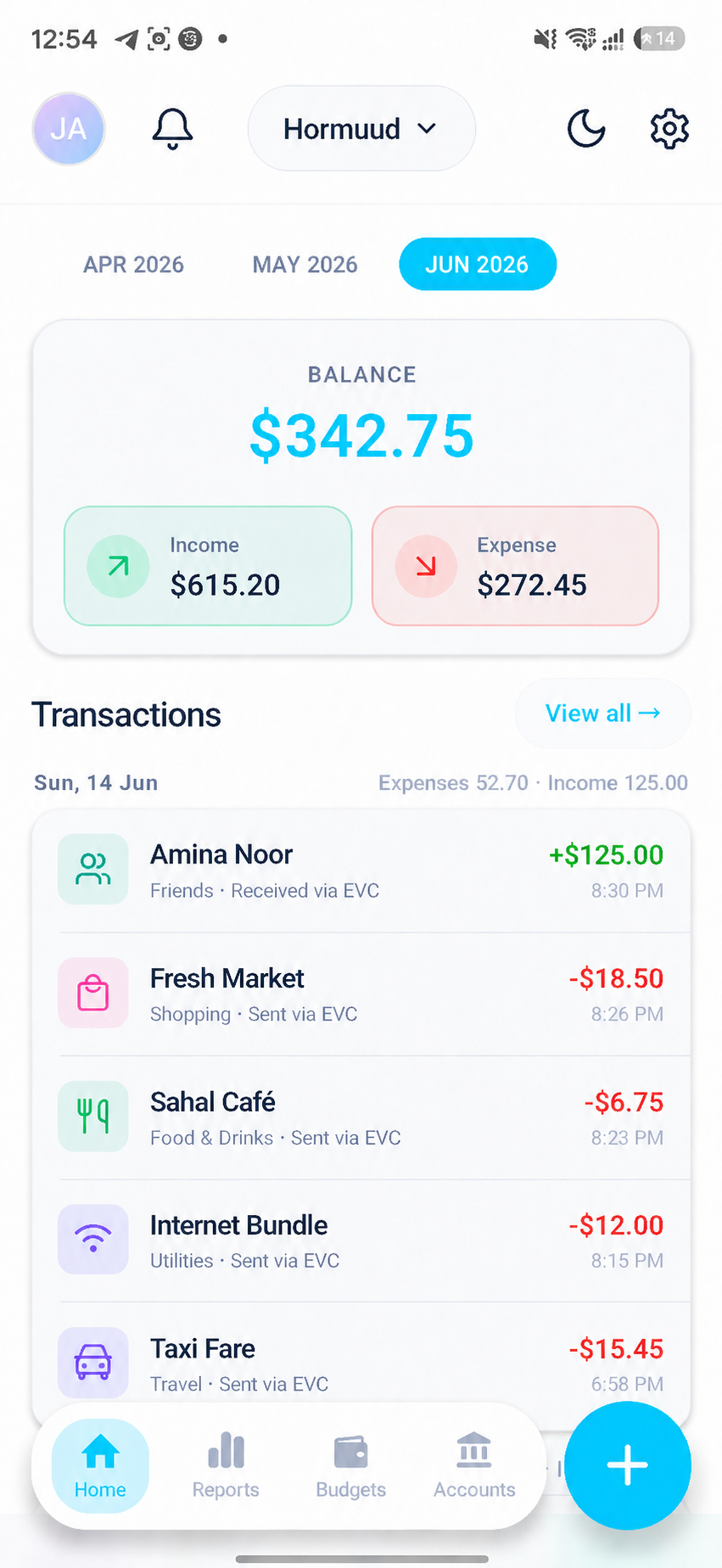
Smart Dashboard
Your money overview at a glance, with balance, income, expenses, and recent transactions.
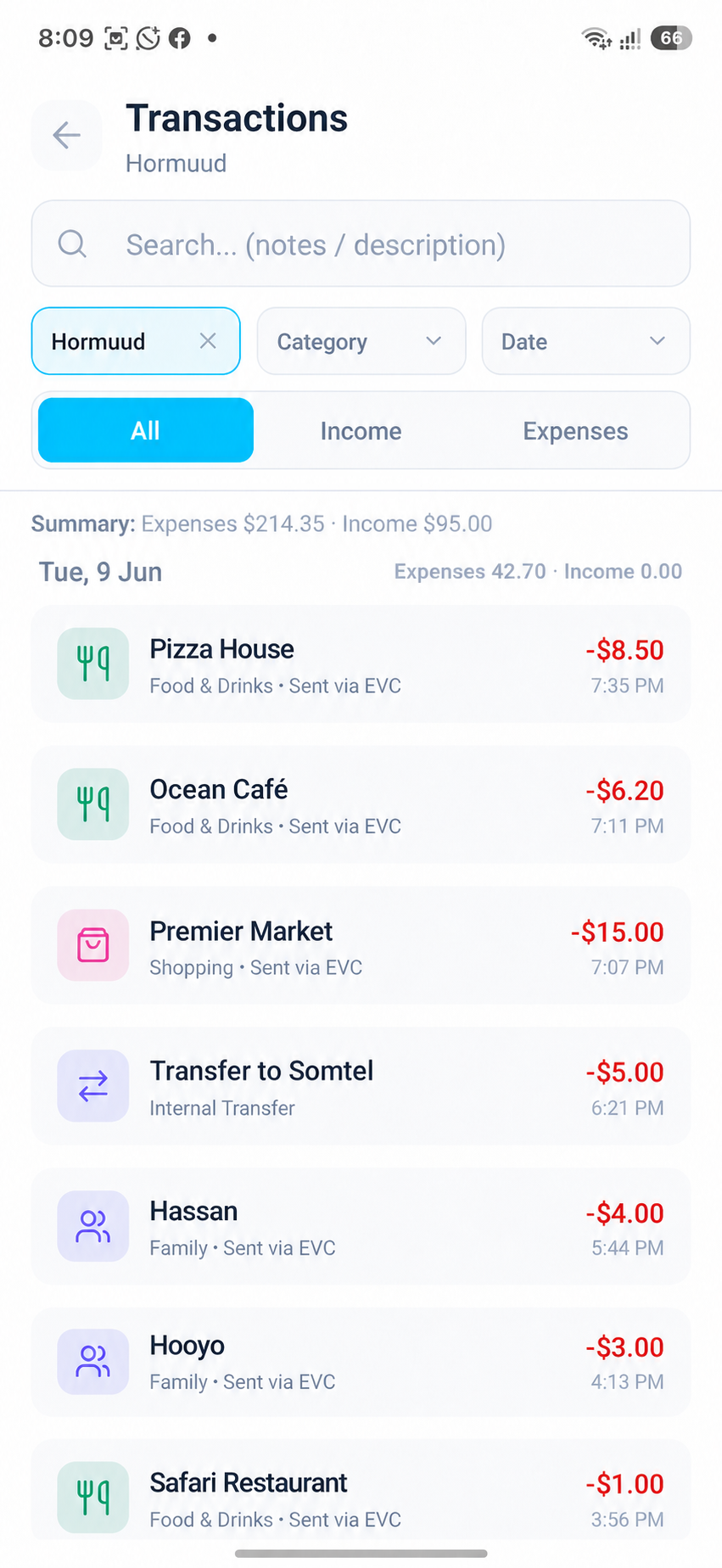
Transaction History
Search, filter, and review your transactions automatically organized from SMS.
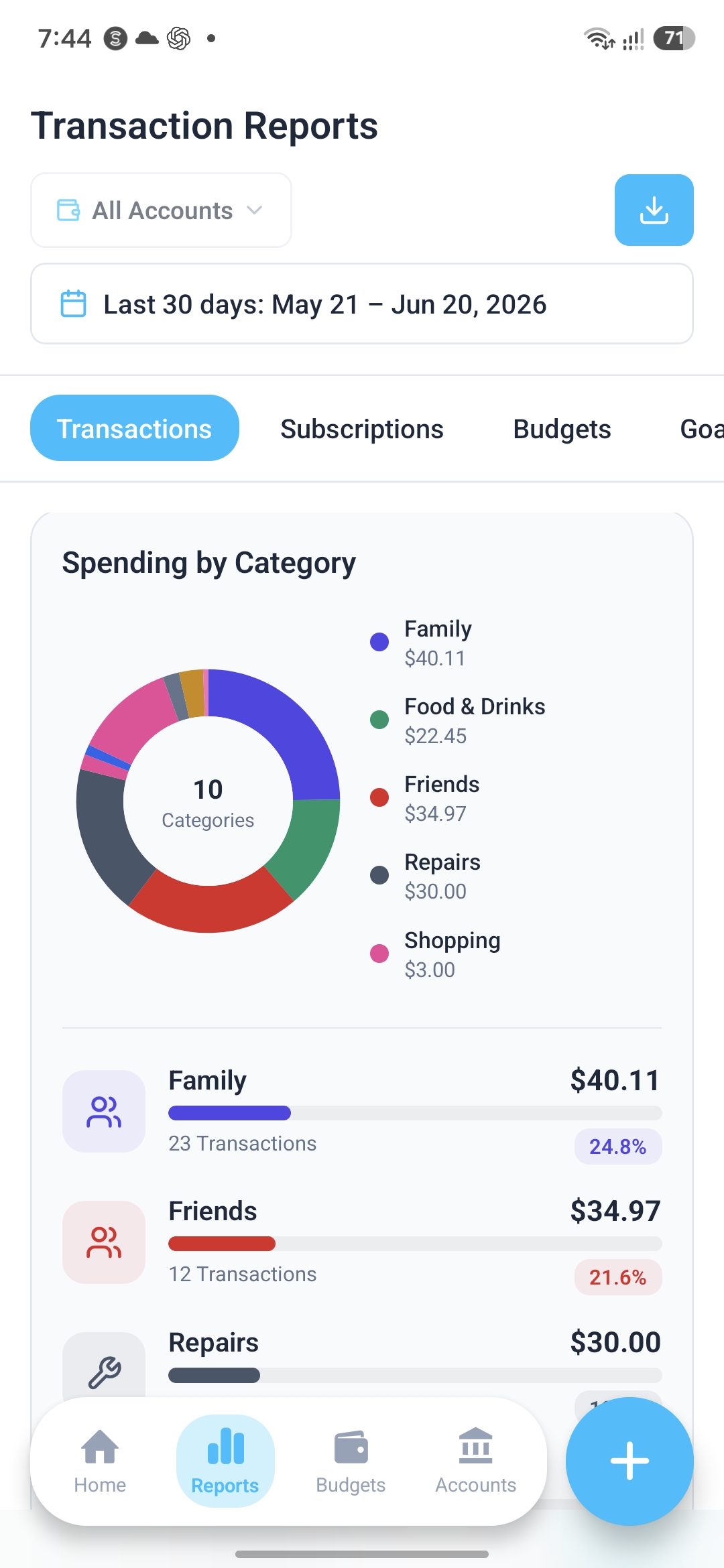
Visual Insights
Clear charts help you understand where your money goes over time.
Smart SMS Detection
The core magic of Qoondeeye. No manual entry. Our smart engine detects financial SMS from all Somali providers and categorizes them in milliseconds.
"EVCPlus: - $15.00 to 061XXXXXX. Your new balance is $145.00..."

Full Offline Support
No internet? No problem. Qoondeeye can detect and show your transactions locally on your device. When internet is available, your records may sync securely with your account for backup and access after reinstalling or logging in again.
Smart Categories
Auto-detects groceries, utilities, rent, and family transfers based on transaction patterns.
Multi-Provider
Support for Hormuud EVC Plus, Somnet Jeeb, Salaam Bank, and Somtel eDahab—all in one app.
Custom Reports
Export deep dives into your spending habits to PDF or Excel. Professional insights for your wealth.
Privacy-first SMS tracking you control.
Qoondeeye detects transaction SMS only when SMS Auto Import is enabled. You can turn it off anytime from Settings.
Optional Permissions
SMS Auto Import is optional. You can use Qoondeeye manually without enabling SMS access.
Transaction SMS Only
Qoondeeye is designed to detect supported transaction SMS patterns. Personal messages and OTPs are not saved as transactions.
On-device SMS Detection
Qoondeeye detects supported transaction SMS on your phone when SMS Auto Import is enabled. Your transaction records are organized in the app and may be securely synced to your account so your data can be restored when you log in again.
More tools to manage your money.
Budgets, subscriptions, loans, goals, and accounts help you stay organized beyond automatic transaction tracking.
Budgets
Plan monthly spending and stay within smart limits.
Subscriptions
Track recurring payments and automated reminders.
Loans
Keep detailed records of money borrowed or lent.
Goals
Save toward personal goals and track your progress.
Accounts
Organize all your financial accounts in one space.
Frequently Asked Questions
Is my money safe with Qoondeeye?
Qoondeeye is a monitoring tool, not a wallet. We never have access to your actual funds. We only read the transaction confirmation messages you receive to help you visualize your spending habits.
How much does it cost?
Qoondeeye is currently free to download and use. If paid features are added in the future, they will be clearly explained inside the app before you choose to use them.
Will it drain my battery?
No. Qoondeeye only wakes up for a fraction of a second when you receive a financial SMS. It's designed to be extremely lightweight and energy-efficient, having zero impact on your daily battery life.
Does Qoondeeye read all my SMS messages?
No. SMS Auto Import is optional, and Qoondeeye is designed to detect transaction SMS patterns from supported providers. You can turn SMS Auto Import off anytime from Settings.
Is Qoondeeye a wallet or bank?
No. Qoondeeye is not a wallet, bank, or payment service. It does not hold, send, or receive money. It only helps you organize and understand your transaction records.
What if Qoondeeye misses a transaction?
Some providers may send new or unsupported SMS formats. If a transaction is missed, you can report the SMS format through support so we can improve detection in future updates.
Which devices are supported?
Qoondeeye is currently built for Android devices. SMS Auto Import depends on Android SMS permissions.
Ready to take control?
Join Somali families building a better financial future with Qoondeeye. Download now and start tracking for free.